Minimalist Line Drawing Leaves SVG Set: A Guide to Flawless Botanical Crafting
The appeal of botanical designs in modern crafting is undeniable. Clean, elegant lines can transform a simple t-shirt into a statement piece or turn a plain journal cover into a work of art. The Minimalist Line Drawing Leaves SVG Set offers exactly this aesthetic, providing seven distinct folders of high-quality vector elements designed for delicate and sophisticated projects. However, owning the files is only half the battle. Many crafters, from hobbyists to small business owners, encounter frustrating results not because their machines are faulty, but because they misunderstand how these specific file types function within design software.
To truly enhance your crafts with this set, you must look beyond the download link and understand the technical nuances of single-stroke vectors. Whether you are using a Cricut, Silhouette Sketch, or Foil Quill, the difference between a professional finish and a jagged mess often lies in how you prepare the file before sending it to your machine.
Understanding the Single Stroke Advantage
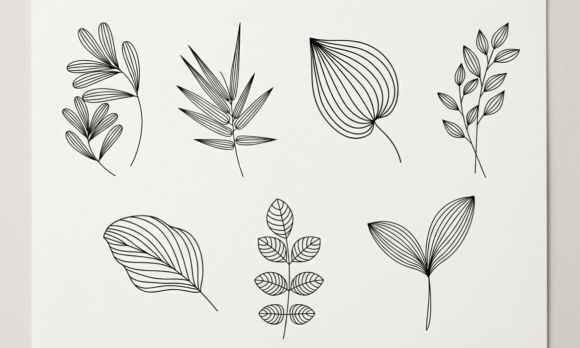
The core feature of this collection is its "Single Stroke" and "Open Path" design. Unlike standard clip art where shapes are filled with color, these leaves are drawn as continuous lines. This makes them ideal for the Foil Quill attachment, which mimics a pen to draw intricate details on various surfaces. It also works beautifully for sketch-style vinyl cuts that add texture without overwhelming the design.
Many users mistakenly treat these files like standard cut files. They import the image, select the entire group, and attempt to cut it as a solid shape. This approach fails because the software interprets the open paths incorrectly, often creating unwanted diagonal connectors or failing to recognize the line entirely. Understanding that these are drawing files, not just cutting files, is the first step toward avoiding wasted materials and time.
Common Pitfalls When Using Editable Stroke Files
One of the most frequent errors involves the handling of the "Editable Stroke" version included in the package. This feature allows you to change the thickness of the line to match your desired outcome. For example, a thin 0.5pt stroke might be perfect for a delicate foil quill project, while a 2pt stroke could be necessary for a bold vinyl application. The mistake happens when users expand the stroke too early or fail to adjust it at all.
If you expand a single stroke into a closed shape before adjusting the weight, you lose the ability to modify the line thickness later. You are locked into whatever default setting the file had when you downloaded it. Furthermore, expanding an open path can sometimes create tiny, invisible anchor points that confuse cutting machines, leading to misaligned cuts or broken lines. Always keep the stroke editable until you have finalized your design size and material requirements.
File Format Confusion and Compatibility
This set comes in multiple formats: SVG, DXF, EPS, Ai, PNG, and JPG. While having options sounds convenient, it often leads to confusion regarding which file to use. A common misunderstanding is assuming that a PNG or JPG will work well for cutting. These raster formats are great for printing or visual reference, but they lack the vector data needed for precise cutting or drawing. If you try to trace a low-resolution JPG in your design software, the resulting paths will be jagged and uneven, ruining the minimalist aesthetic.
Always prioritize the vector formats (SVG, DXF, EPS, or Ai) for any machine-based crafting. Specifically, the SVG format is generally the most reliable for web-based design studios, while AI or EPS may be better suited for desktop applications like Adobe Illustrator. Using the wrong format can result in scalability issues; if you stretch a raster image to fit a large banner, it will pixelate, whereas a vector file remains crisp at any size.
Optimizing Your Workflow for Foil Quill and Vinyl
The versatility of the Minimalist Line Drawing Leaves SVG Set extends to both drawing and cutting, but each requires a different workflow. For Foil Quill projects, the goal is to mimic hand-drawn elegance. Here, the "Expanded version" mentioned in the product description should be used with caution. If you intend to draw, you want the software to follow the center of the line. If you accidentally use the expanded version meant for vinyl, the tool might try to cut out the inside of the leaf rather than drawing the outline.
Conversely, for vinyl cutting, the expanded version is often preferable. Vinyl needs a closed shape to adhere properly. An open path cannot hold adhesive unless it is converted into a solid object. The mistake here is trying to cut an open path directly. The machine will simply ignore the line or produce erratic movements. By using the expanded version provided in the separate folders, you ensure the vinyl cutter treats the leaf as a solid decal, resulting in clean edges and easy weeding.
Evaluating Quality Before You Start
Before committing to a large batch of production or a complex custom order, it is wise to perform a test run. Check the node count of your design. High-quality vector files have efficient node structures that make cutting faster and more accurate. Poorly optimized files may have thousands of unnecessary nodes, causing the machine to slow down or stutter, which can lead to blade drag or foil smearing.
Additionally, inspect the alignment of the layers. Since this set includes seven individual folders, ensure that you are working with the correct layer for your specific task. Mixing the editable stroke version with the expanded version in the same project can cause registration issues. Keep your workspace organized by separating drawing tasks from cutting tasks. This simple organizational habit prevents the frustration of re-doing a project because the lines didn't match up.
Practical Steps for Better Results
- Verify File Type: Confirm you are opening the SVG or AI file, not the preview image, before importing into your design software.
- Adjust Stroke Weight First: Change the line thickness to your preference while the stroke is still editable. Do not expand the shape until this step is complete.
- Select the Correct Version: Use the "Editable Stroke" version for Foil Quill and Sketch modes. Switch to the "Expanded" version only when preparing for vinyl cutting.
- Test Cut: Run a scrap piece through your machine to check for speed and pressure settings before using expensive materials.
- Check for Open Paths: Ensure that any design intended for vinyl has been fully expanded and closed. Open paths will not cut correctly in vinyl mode.
By approaching the Minimalist Line Drawing Leaves SVG Set with a clear understanding of its technical capabilities, you avoid the common traps that plague many digital crafters. The beauty of minimalist design lies in its simplicity, but achieving that simplicity requires precision. When you respect the distinction between drawing and cutting files, manage your stroke weights effectively, and choose the right format for your machine, you unlock the full potential of these elegant botanical elements. This attention to detail ensures that every project, whether a one-off gift or a commercial product, maintains the high quality and professional finish that modern consumers expect.